
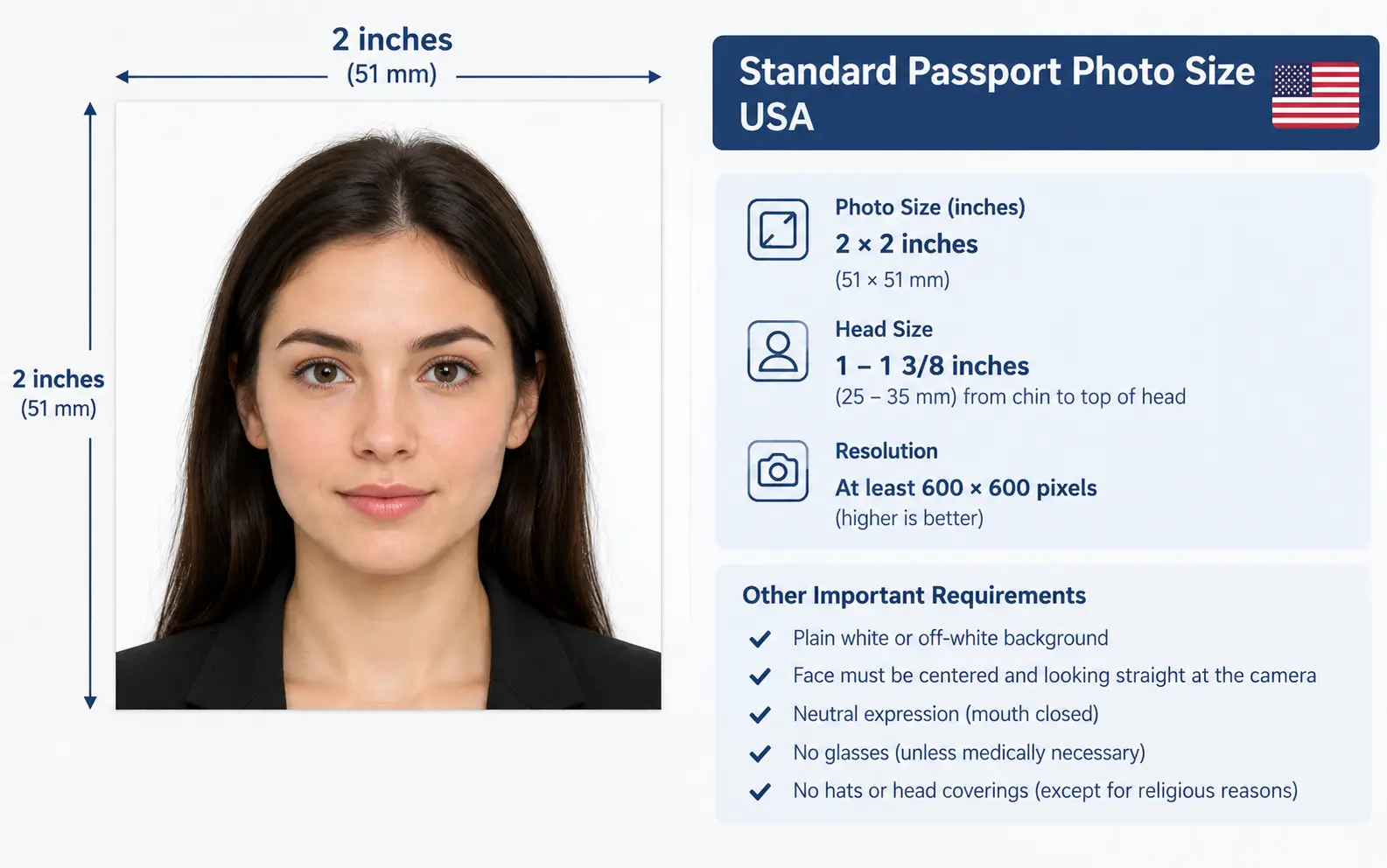
The standard US passport photo size is 2 x 2 inches (51 x 51 mm), printed as a perfect square. Within that square, your head must measure between 1 inch and 1 3/8 inches (25-35 mm) from the bottom of your chin to the top of your head. If you're uploading a digital photo for online renewal instead of printing one, the file needs to be 600 x 600 to 1200 x 1200 pixels, also a 1:1 square ratio.
That's the number everyone searches for. But the size is the easy part. I've watched people nail the 2x2 inch dimension perfectly and still get their application flagged, because the size measurement isn't where most photos fail. Let's get into what actually trips people up, and what the official pages don't spell out clearly.
Why the 2x2 Inch Rule Exists in the First Place
The 2x2 inch format isn't a random government preference. It's tied to facial recognition software used by the State Department and international border systems that follow ICAO (International Civil Aviation Organization) standards.
That square shape and specific head-to-frame ratio lets algorithms locate your eyes, nose, and jawline in a consistent position every time. Too much headroom or too little, and the software can't map your features against the photo on file from your last passport.
This is also why your head size isn't just "roughly centered." The 1 to 1 3/8 inch head measurement translates to your head occupying somewhere between 50% and 69% of the photo's total height. Miss that window in either direction and a human reviewer (or the automated system, for digital renewals) will bounce your application.
Printed Photo vs Digital Upload: Two Different Size Systems
Most competitor guides treat "passport photo size" as one fixed number. In practice, the US now runs two parallel systems depending on how you're applying, and mixing them up is a common, avoidable mistake.
| Application Method | Size Requirement | Format | Where It Applies |
|---|---|---|---|
| Paper application (Form DS-11 or DS-82 by mail) | 2 x 2 inches (51 x 51 mm) printed | Physical photo on photo-quality paper | First-time applicants, applicants under 16, in-person renewals |
| Online renewal (MyTravelGov) | 600 x 600 to 1200 x 1200 pixels | JPG, PNG, HEIC, or HEIF, 54 KB to 10 MB | Eligible adult renewals only |
If you're renewing online, you don't print anything. You upload a digital file straight from your phone or camera. But that upload path is only open to a specific group: adults renewing a 10-year passport that was issued at 16 or older, expires within a year or expired in the last five years, with no name or gender marker changes, and a passport that's still in your possession and undamaged.
Everyone else, including first-time applicants and anyone under 16, still needs a physical printed photo submitted with a paper form. There's no digital shortcut for that group, no matter how the photo was originally captured.
The Measurement Mistake Almost Nobody Warns You About
Here's something the official guidance mentions only briefly, and most third-party articles skip entirely: home printers routinely scale images during printing, which throws off your 2x2 inch dimension even when the digital file was sized correctly.
If you print a "2x2 inch" file at home and your printer's "fit to page" or "borderless" setting is turned on, it can stretch or shrink the actual printed square by a few millimeters. That's enough to push your head measurement outside the 25-35mm window, even though the source file was technically correct.
Practical fix: print at "actual size" or "100%" scale, never "fit to page," and measure the finished printout with a ruler before you submit it. A cheap physical ruler check takes ten seconds and catches a problem no software preview will show you.
Head Size: The Real Reason Photos Get Rejected
Size and position problems are the single biggest cause of passport photo rejection, ahead of lighting or background issues. Here's what actually causes it:
- Standing too close to the camera makes your head too large for the frame, pushing past the 1 3/8 inch maximum.
- Standing too far away shrinks your head below the 1 inch minimum, a mistake that's surprisingly common with phone selfies taken at arm's length.
- Tilting your head forward or to the side changes the effective chin-to-crown measurement even if your distance from the camera was correct.
A trick that works better than guessing: have the photographer (or whoever's holding the phone) stand several feet back and zoom in slightly, rather than standing close and using a wide lens. Wide-angle lenses at close range distort facial proportions and make consistent head-size measurement harder to hit.
Your hair is allowed to extend past the edges of the photo frame. What matters is that your entire head shape is visible and correctly sized. Big hair doesn't disqualify you; a cropped-off head does.
The 2026 AI-Editing Rule Most Guides Haven't Caught Up To
This is genuinely new, and it's worth flagging because it changes how you should think about "fixing" a photo before you submit it. As of the most recent update to the official photo requirements, the State Department explicitly checks submitted photos to detect whether they were altered using artificial intelligence tools, not just traditional filters or Photoshop.
This isn't a vague warning. Their published examples show a photo edited with AI-based background or feature enhancement being marked unacceptable, even when the result looked completely natural to the human eye. The stated review process now specifically screens for AI-generated or AI-modified images.
What this means practically:
- Don't use AI photo-enhancement apps to "fix" lighting, smooth skin, or clean up a background before submitting.
- Don't use AI tools to remove eyeglasses, red eye, or blemishes. If your photo has red eye, retake it with adjusted flash settings instead.
- If your background isn't fully white, retake the photo against a proper background rather than editing it digitally. Cropping or replacing a background with software counts as a disqualifying digital change.
The safest approach in 2026 is the one photographers have used for decades: get the lighting, background, and pose right at the moment you take the photo, and submit it completely unedited.
Visa Photos Use the Same Inches, With One Different Number
If you're applying for a US visa rather than a passport, the photo size is identical: 2 x 2 inches (51 x 51 mm). But the head-size specification is described slightly differently, and conflating the two causes confusion.
For visa photos, the head must measure between 1 and 1 3/8 inches, described as 50% to 69% of the image's total height from chin to crown. That percentage-based framing exists because visa photos are also submitted digitally through DS-160 and DS-260 forms, where pixel proportions matter more than a physical ruler measurement.
For immigrant visa applicants using Form DS-260, you'll need two identical printed photos on photo-quality paper at your interview, in addition to whatever digital photo was uploaded with your online application.
Diversity Visa (DV) Lottery Has Its Own Stricter File Limit
This is a detail that gets buried or omitted in most passport-focused articles, but it matters if you're applying through the DV Lottery program. DV Lottery photos must be:
- JPEG format only (not PNG or HEIF)
- Maximum file size of 240 KB, considerably smaller than the 10 MB ceiling for passport renewals
- Same 600 x 600 to 1200 x 1200 pixel dimensions and square ratio
If you've already prepared a photo for a passport renewal and try to reuse the same file for a DV Lottery entry, it will likely bounce for being too large. Compress it down separately rather than assuming one file works everywhere.
Babies, Toddlers, and the Rules Parents Usually Get Wrong
Infant and toddler passport photos follow the same 2x2 inch and head-size rules as adults, but with a few adjustments that aren't obvious until you're standing there trying to photograph a squirming one-year-old:
- It's fine if a baby's eyes aren't fully open. This exception doesn't extend to toddlers or older children, who must have both eyes open.
- No adult hands, arms, or other body parts can appear in the frame. A common failed submission is a parent's hand visible while steadying the baby's head.
- Lay a plain white or off-white sheet or blanket in a car seat, then photograph the child in the seat. This solves the "how do I get a newborn to sit still against a wall" problem without needing a studio setup.
- The child's expression must be neutral, no exaggerated smiles or open-mouth shots, even though this is genuinely hard to control with a toddler.
What If You Wear Glasses, a Head Covering, or Have a Disability
A few situations have documented exceptions that people often assume don't exist:
- Medical inability to remove glasses: you can keep them on if you include a signed note from your doctor with your application. Glasses can't be resting on top of your head as a workaround; that's still treated as a rejection.
- Religious head coverings: allowed if you submit a signed statement confirming it's worn daily in public for religious reasons. Your full face still needs to be visible, with no shadows across it.
- Wheelchair users: if part of a wheelchair's head support appears in the background, that's acceptable as long as you include a note explaining why the background isn't completely plain white.
- Medical head coverings: allowed with a signed doctor's statement, same visibility requirements apply.
None of these exceptions are automatic. Each one requires the accompanying signed documentation submitted alongside your application, not just a verbal explanation at the counter.
Do You Actually Need a New Photo, or Just a New Passport?
Here's a question that has nothing to do with sizing but comes up constantly once people understand the size rules: does a changed appearance mean you need to redo your passport photo before it expires?
You don't need a new passport for:
- Growing a beard
- Coloring your hair
- Normal aging
You do need a new passport for:
- Significant facial surgery or trauma that changes your identifiable features
- Adding or removing several large facial piercings or tattoos
- Significant weight loss or gain that changes your appearance substantially
The underlying test is simple: if you can still reasonably be identified from your current passport photo, you don't need to replace it early just because you look different.
Where to Actually Get the Photo Taken
You have three realistic options, and the size specification doesn't change based on which one you pick:
- An acceptance facility, many of which take compliant photos on-site during your application
- Retail photo counters at pharmacies, shipping stores, or big-box retailers, which typically know the 2x2 inch spec by default
- A friend or family member with a plain white wall and a phone camera, which works fine as long as you're careful about lighting and distance
If you go the DIY route, use the government's official Photo Composition Template as a visual reference for exact head placement and size before you take the shot, rather than eyeballing it.
FAQ: Passport Photo Size Questions People Actually Ask
Can I use a phone camera for my passport photo, or does it need to be a professional camera?
A phone camera works fine as long as the resolution is high enough to avoid grain or blur, and you can control lighting and distance accurately. What fails phone photos most often isn't the camera itself, it's inconsistent lighting or being too close to the lens.Is a 2x2 passport photo the same as a standard wallet-size or ID photo?
No. Many ID photos use different head-size ratios or aspect ratios. A generic "passport-style" photo from a random photo booth isn't guaranteed to meet the specific 1 to 1 3/8 inch head measurement the US requires.Can I crop an existing photo down to 2x2 inches myself?
You can, but cropping doesn't fix underlying issues like an off-white background, incorrect head size, or shadows. Cropping also counts as a digital change if it alters your head, face, or neck outline, which the State Department flags as unacceptable.What happens if my printed photo is slightly off from 2x2 inches?
Even a small deviation can cause rejection, because the head-size measurement is calculated as a proportion of the frame. A photo printed at 1.9 x 1.9 inches will also throw off your head-size ratio, not just the outer dimension.Do children need the same photo size as adults?
Yes, the 2x2 inch and head-size specifications are identical for all ages, including infants. The differences for babies relate to expression and background handling, not the actual size measurements.Can I wear makeup in my passport photo?
Normal, everyday makeup is fine. The rule against digital alteration applies to editing software and filters, not to makeup applied before the photo is taken.How recent does my passport photo need to be?
It must have been taken within the last 6 months, reflecting your current appearance. This applies whether you're printing a physical copy or uploading a digital file for online renewal.